Just a db project
2025-01-21
·
Cristian Jesus Alvarez Hernandez
It is a simple docker container running a postgres server in a aws ec2 instance with a cron job for backups stored in s3, nothing else, that's it. Just run a command and you will have your boring database.
Description
It is a simple docker container running a postgres server in a aws ec2 instance with a cron job for backups stored in s3, nothing else, that's it.
Just run a command and you will have your boring database.
How to use
1. Setup aws cli in your machine
You need to have aws cli installed in your machine and configured with your aws credentials with enough permissions to create the stack in cloudformation.
2. Setup the environment variables
You need to specify the s3 bucket for backups in a .env file in the project root folder, the rest of the variables are optional and will use the default values, use .env.example as a reference, example:
BACKUP_CRON_EXPRESSION="0 2 * * *"
S3_BUCKET=just-a-db-backups
AWS_REGION=us-east-1
3. Launch
Run the following command
make setup
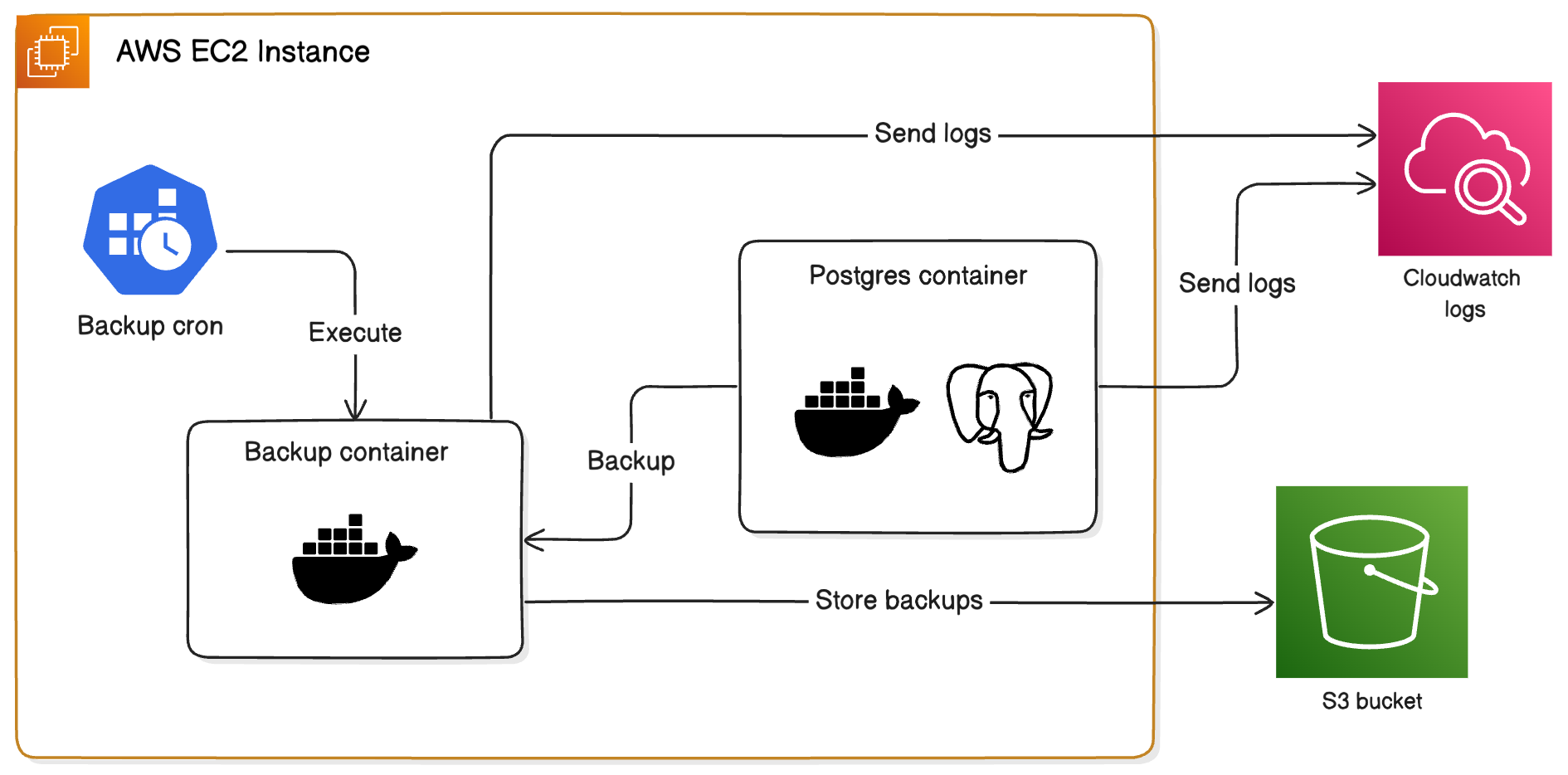
That's all, it will create the following infrastructure in you aws account:
Details
- You can see the logs in CloudWatch Logs, the log groups are
just-a-db/database-logsandjust-a-db/backup-logs. - You can see the backups in S3 organized by database name, with files named
backup_<database_name>_<timestamp>.sql.gz. Only the 3 most recent backups are kept, the oldest ones are deleted. - The default database is created with the name
just-a-db. - The credentials are created in the deployment stack process, you can see them executing the command
make credentials, it will store the credentials in thecredentials.txtfile. - In the root folder you will find
just-a-db.pemfile, that is the private key for the ec2 instance, you need to keep it safe and secure.
Useful commands
make connectConnect to the ec2 instance using the private key via ssh.make credentialsGet the credentials for the database and store them in thecredentials.txtfile.make destroyDestroy the infrastructure (aws cloudformation stack).
Comments
Cristian Jesus Alvarez Hernandez
2025-01-21, 2:46 a.m.
Hi
Cristian Jesus Alvarez Hernandez
2025-01-21, 2:41 a.m.
Nice, brou